1.1.1 Front Panel
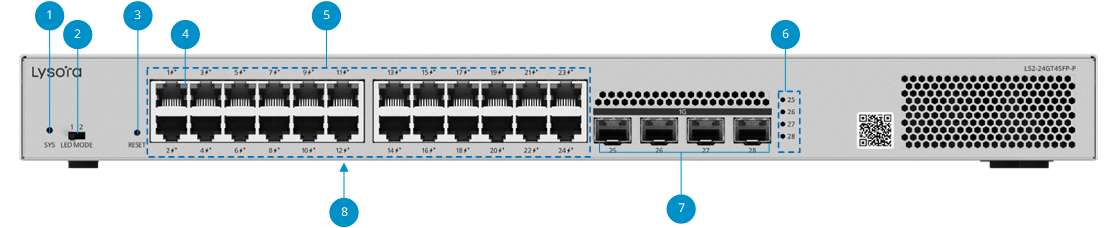
Figure1-2 Front Panel of LS2-24GT4SFP-P
Note
 indicates PoE+ port, which is
compliant with IEEE 802.3af and IEEE 802.3at.
indicates PoE+ port, which is
compliant with IEEE 802.3af and IEEE 802.3at.
Table1-1 Front Panel Description of LS2-24GT4SFP-P
|
No. |
Silkscreen |
Component |
Description |
|
1 |
SYS |
System status LED |
For details about the LED status, see 1.1.3 LED. |
|
2 |
LED MODE |
Port LED switch |
l LED switch toggled to left (Mode 1): the port LED status indicates the status of traffic transmission. l LED switch toggled to right (Mode 2): The port LED status indicates the PoE status. |
|
3 |
RESET |
Reset button |
l Press and hold the button for less than 2s: Restart the switch. l Press and hold the button for more than 5s: Press and hold the button for more than 5s until the system status LED starts blinking to restore factory settings and restart the switch. l Press and hold for 2s to 5s: No action is triggered. |
|
4 |
1-24 |
10/100/1000Base-T Ethernet port status LED |
For details about the LED status, see 1.1.3 LED. |
|
5 |
1-24 |
10/100/1000Base-T Ethernet port |
24 x 10/100/1000BASE-T ports, with ports 1-24 supporting PoE/PoE+. |
|
6 |
25-28 |
SFP port status LED |
For details about the LED status, see 1.1.3 LED. |
|
7 |
25-28 (1G) |
1GE SFP port |
4 x 1GE SFP Port |
|
8 |
/ |
Nameplate |
The nameplate is located at the bottom of the device. |